How Allot automates the tedious half
The method above is correct but fiddly to maintain by hand — especially step 3, where most spreadsheets quietly fall apart. Allot does that bookkeeping for you.
A payment envelope per card, created for you
Add a Credit Card account and Allot creates a matching payment category under a Credit Card Payments group — one per card, named after it. You never create or maintain it manually.
Funded automatically from real spending
Every charge you record on the card raises that card's payment amount by the same figure, live. No guessing next month's bill — the reserved amount is what you actually spent.
No double counting, by design
Card payment categories are excluded from Ready-to-Assign and from month-to-month budget copying, because the spending was already counted in Groceries, Transport and the rest.
One-tap payment, pre-filled
The Budget screen shows each card with what carried over, what was charged this period, and what you've paid. Hit Pay and Allot opens a transfer with the card and amount already filled in.
Three optional fields that change what you can see
Set an account's type to Credit Card and three extra fields appear — statement date, credit limit and spending cap. All optional, all one-time. Each answers a different question, and most budgeting tools collapse them into a single "you owe this much" figure.
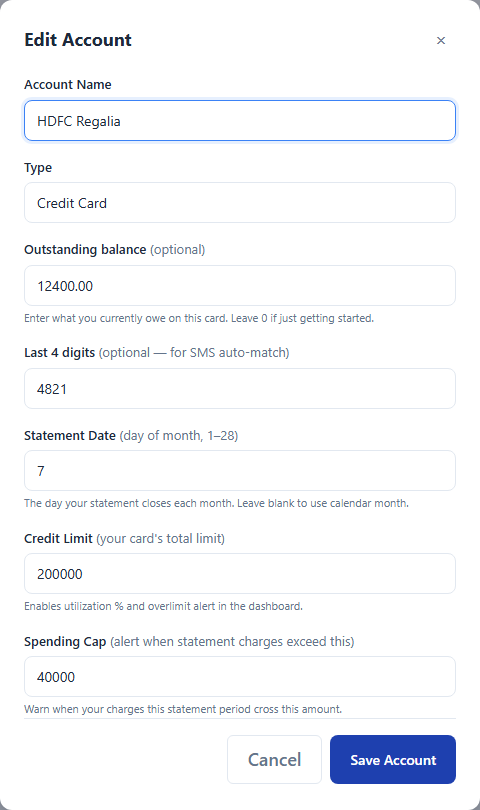
| Field | Question it answers | What Allot measures |
|---|---|---|
| Statement date | What will this bill be? | Charges over your real billing cycle, not the calendar month |
| Credit limit | How leveraged am I on this card? | Total outstanding debt against the bank's ceiling |
| Spending cap | Am I overspending right now? | Charges in the cycle currently open against your own ceiling |
Statement date — the calendar month is the wrong window
Cards don't bill by calendar month, so a budget that measures by calendar month always answers a question you didn't ask. If your statement closes on the 7th, a purchase on 3 July belongs to the bill that closed on 6 July — it's due in days. A purchase on 9 July belongs to the next bill, five weeks out. Identical dates on a calendar view; completely different urgency.
Give Allot the closing day and it shifts the whole window. Viewing July with a statement date of the 7th, it reports on 7 June – 6 July — labelled as such, so there's no ambiguity about which bill you're looking at. Anything charged since the 7th is held back for the next cycle rather than muddled into this one.
Why this matters at month end: late-month spending is exactly when people misjudge a bill. A calendar view tells you what you spent in July. The statement view tells you what you have to pay, and when — which is the number that actually has a due date attached.
Credit limit — utilisation, tracked continuously
Enter the limit and Allot draws a utilisation bar: total owed as a percentage of it, updating with every charge you record. It turns amber at 80% and red at 90%, with a warning marker on the label, so the number you care about announces itself instead of waiting to be checked.
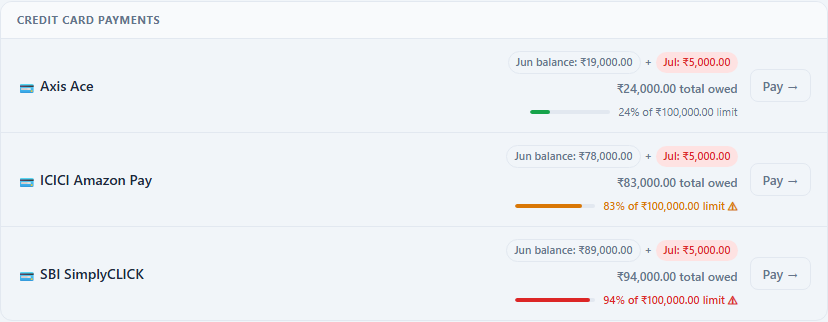
Utilisation is the second-largest input into most credit scores, and it's usually the outstanding balance when the statement closes that gets reported — not your average, and not the balance after you pay. Watching a card drift toward that amber band during the cycle is what lets you make a part payment before the statement closes, rather than discovering the damage a month later.
Note the middle and bottom cards above have no statement date set — their chips fall back to plain calendar months (Jun balance, Jul). Utilisation works regardless; the statement date only sharpens which window the charges are grouped into.
Spending cap — your ceiling, not the bank's
The limit is the bank's number, and it's set to be generous. The cap is yours. Set it to what you actually intend to put on the card in a cycle — ₹40,000 on a ₹2,00,000 limit — and Allot tracks charges in the currently open cycle against it, on its own bar, with its own thresholds: amber at 80%, red plus an ⚠ Over cap flag the moment you cross 100%.
Because a cap is only useful if you see it before you spend, every capped card also gets a line in a summary bar pinned to the top of the Budget screen — directly under Ready to Assign, above the categories. It's the first thing on the page:

The whole strip picks up a red tint when any one card is over its cap, so the warning reads at a glance without parsing individual rows:
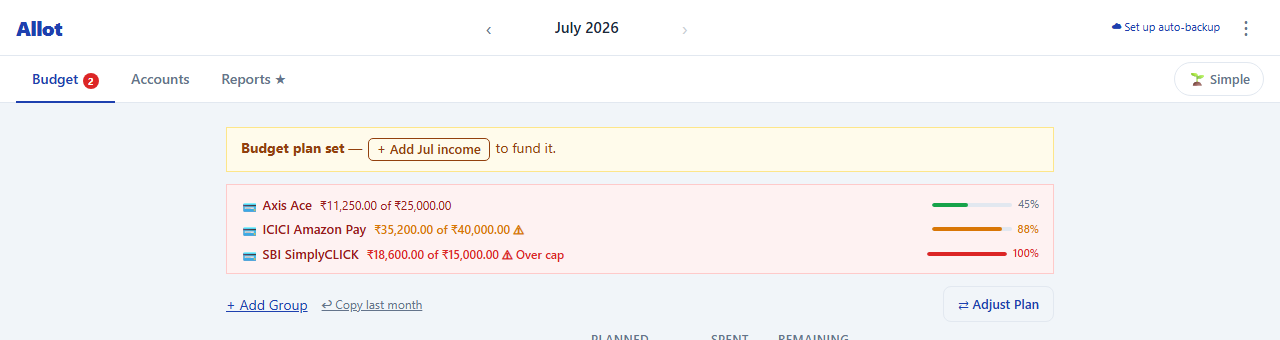
This is the piece that changes behaviour. Utilisation and the statement total are both reporting — accurate, but they tell you about money already spent. The cap bar is the only one of the three that's in your way before the next swipe.
The two bars deliberately measure different things. Utilisation is total debt vs the bank's limit — a stock, including anything carried from earlier cycles. The cap is charges in the cycle now open vs your own ceiling — a flow, reset each cycle. A card can sit at a comfortable 37% utilisation while you're already 86% through this cycle's intended spending — exactly the case pictured below. One number would hide that; two show it.
What the card actually shows you
With all three set, one card on the Budget screen reads top to bottom as a complete story — where the balance came from, what's due, and whether you're in trouble:
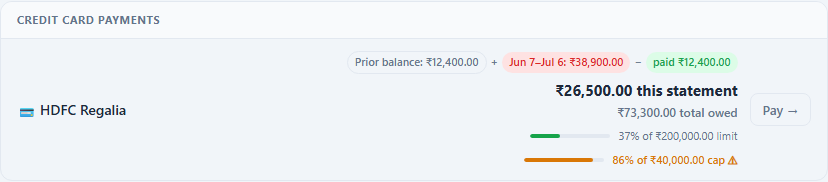
Reading it top to bottom: ₹12,400 carried in, ₹38,900 charged during the 7 Jun–6 Jul cycle, ₹12,400 paid off — leaving ₹26,500 on the statement that just closed. Total owed is higher, ₹73,300, because it also includes everything charged since the 7th, in the cycle still open.
Now read the two bars together. Utilisation sits at 37% — green, nowhere near the 80% mark where Allot starts warning. The cap bar is 86%, amber, flagged. You are in no trouble at all with the bank, and simultaneously nearly out of what you meant to spend this cycle, with days still to run. Both facts are true; a single "total owed" figure shows neither. When the balance clears, the row switches to ✓ Settled and the Pay button disappears.
None of this requires a bank connection. You enter three numbers once, from your card statement, and Allot derives the rest from transactions you were recording anyway.
Getting charges in without typing them
Recording every swipe is the part people abandon. Allot gives you two ways around it:
- CSV import. Import a card statement and Allot inverts the amounts automatically so charges read as expenses and refunds as credits — the sign convention banks use for cards is the opposite of what a budget needs. It also spots bill payments in the file and treats them as payments rather than as new spending.
- Share a transaction SMS. On Android, share your bank's transaction alert to Allot. It reads the amount, and matches the last four digits to the right card, so the charge lands on the correct account.
No bank linking, ever. Allot has no read access to your card. Everything runs in your browser, your data stays on your device, and there's no account to create. A card statement is one of the most revealing documents you own — it shouldn't need to sit on someone else's server for you to budget with it. See how Allot compares to other budget apps without bank linking.
What you get after one full cycle
| Question | Before | With this method in Allot |
|---|---|---|
| What will the bill be? | Find out when it arrives | Visible today, updating with every charge |
| Can I afford to pay it in full? | Hope so | Yes — it was reserved as you spent |
| Where did the money go? | One statement total | Split across real categories |
| Am I near my limit? | Check the bank app | Utilisation bar, plus your own cap alert |
| Did paying the bill wreck my budget? | Usually | No — a transfer touches no envelope |